Airlock Digital vs App Control for Business and AppLocker
Application control is the first strategy in the Essential Eight and one of the most effective controls you can deploy. It’s also the one most often left in audit mode forever, because maintaining the allowlist is hard work.
Microsoft gives you two built-in options. Airlock Digital is a commercial product built around that maintenance problem. They solve the same problem in very different ways.
The Microsoft options
App Control for Business (previously Windows Defender Application Control, or WDAC) is Microsoft’s recommended option. Microsoft says customers who can use it instead of AppLocker should do so. It:
- Is designed as a security feature under Microsoft’s servicing criteria
- Covers drivers as well as applications
- Can trust apps by managed installer (the tool that installed them) or by Microsoft’s reputation service (the Intelligent Security Graph)
- Applies to the whole device, for all users
AppLocker still works and still gets security fixes, but Microsoft says it isn’t getting new features. It’s still useful where you need different rules for different users on a shared machine, such as RDS and multi-session hosts. Microsoft suggests enforcing App Control first and using AppLocker to fine-tune on top.
What Airlock adds
Airlock enforces the same kinds of rules (hash, publisher, path) but wraps them in a workflow:
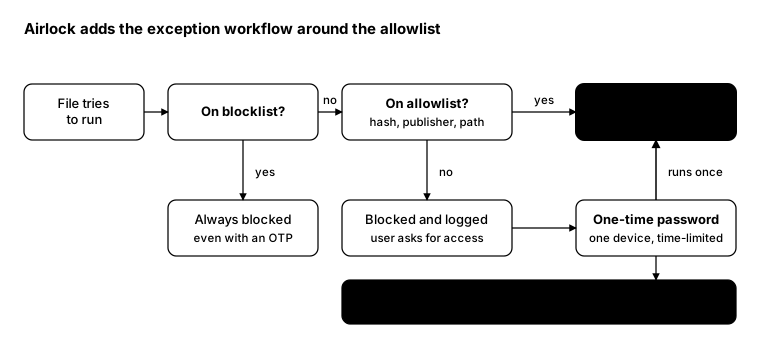
- One-time passwords (OTPs): a code for one device, valid once for a set time, so a user can run something blocked while the help desk is on the phone. It works with poor connectivity.
- Review after the fact: everything run under an OTP is recorded, and the admin decides whether to add it to the allowlist.
- A blocklist that wins: high-risk files and scripts stay blocked even when an exception would allow them.
- One console for policy: building, testing and promoting allowlists without hand-editing policy XML.
Side by side
| App Control for Business | AppLocker | Airlock Digital | |
|---|---|---|---|
| Cost | Built into Windows | Built into Windows | Separate licence |
| Status | Actively developed | Security fixes only | Actively developed |
| Per-user rules | No (whole device) | Yes | Policy groups |
| Drivers | Yes | No | Applications and scripts |
| Exceptions | Policy change and redeploy | Policy change and redeploy | OTP, then review |
| Management | Intune, Group Policy, XML | Group Policy, Intune | Airlock console |
| Essential Eight | Yes, with effort | Yes, with effort | Built around it |
Which one to pick
- Small, stable estate and a strong admin? App Control for Business through Intune is free and effective. Start in audit mode with managed installer.
- Shared multi-session hosts? Add AppLocker for per-user rules on top of App Control.
- Lots of change, many users, or an Essential Eight target? Airlock’s exception workflow is what keeps allowlisting enforced instead of switched back to audit.
From the field: what’s actually enforced?
Policies often say one thing while devices do another. This check reports whether App Control is enforcing or only auditing, whether AppLocker has rules, and whether the Airlock agent is running. It works in Windows PowerShell 5.1 and PowerShell 7.
$dg = Get-CimInstance -Namespace root\Microsoft\Windows\DeviceGuard -ClassName Win32_DeviceGuard
$mode = @{ 0 = 'Off'; 1 = 'Audit'; 2 = 'Enforced' }

[pscustomobject]@{
    AppControlKernel = $mode[[int]$dg.CodeIntegrityPolicyEnforcementStatus]
    AppControlUser   = $mode[[int]$dg.UsermodeCodeIntegrityPolicyEnforcementStatus]
    AppLockerRules   = @((Get-AppLockerPolicy -Effective).RuleCollections | ForEach-Object { $_ }).Count
    AirlockAgent     = (Get-Service -DisplayName '*Airlock*' -ErrorAction SilentlyContinue |
                        Select-Object -First 1).Status
}
Run it through Invoke-Command across your session hosts. Audit on a production host is a finding worth
chasing.
Bottom line
Microsoft’s built-in tools can meet the requirement if you have the time to maintain them. Airlock costs money but makes allowlisting something you can keep enforced while the business keeps changing.