Citrix DaaS Add-ons: Which Problem Each One Solves
Citrix has added a lot around DaaS in the last couple of years, partly through acquisitions like deviceTRUST and uberAgent. The names don’t make it obvious what each one is for, so here they are sorted by the question each one answers.
The add-ons at a glance
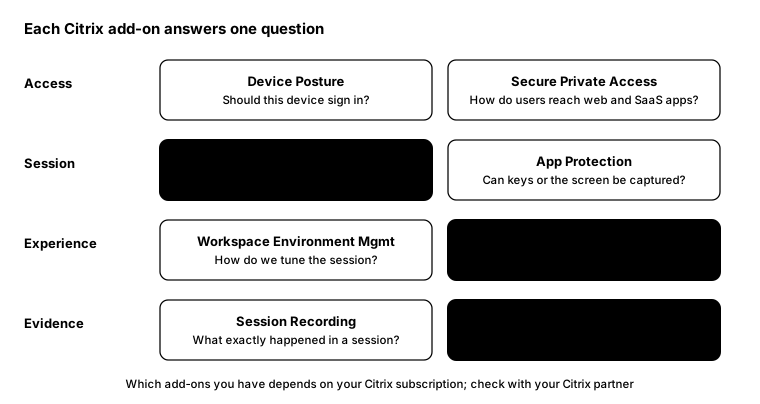
Access
- Device Posture service: checks the device before sign-in, using things like OS version, Workspace app version, antivirus, MDM enrolment and certificates. It can deny sign-in, or hide apps and limit features.
- Secure Private Access and Enterprise Browser: zero-trust access to internal web and SaaS apps without a VPN, with security controls applied in the browser.
Session
- deviceTRUST: keeps checking device context during the session (network, USB, firewall, location) and can lock, disconnect, notify or audit when it changes.
- App Protection: anti-keylogging and anti-screen capture in Citrix Workspace app, plus DLL injection protection on Windows. It’s supported on Windows, Mac, Linux, iOS and Android, but not on HTML5 or ChromeOS.
Experience
- Workspace Environment Management (WEM): CPU and memory optimisation, logon tuning and user environment settings, managed from the cloud.
- uberAgent UXM: detailed experience monitoring on every endpoint, Citrix or not: logon times, app performance, reliability and network problems.
Evidence
- Session Recording: records sessions for audit, compliance or troubleshooting. Use it for privileged and sensitive work rather than everyone.
- uberAgent ESA: behaviour-based threat detection with MITRE ATT&CK mapping, alongside your EDR.
Where to start
For most customers I’d start with three:
- App Protection on any delivery group used from personal or contractor devices.
- Device Posture to block old Workspace app versions and unmanaged devices from sensitive apps.
- deviceTRUST in audit mode, to see how often context changes mid-session before you enforce anything.
Licensing
Which of these you’re entitled to depends on your Citrix subscription, such as the Citrix Platform License or Universal Hybrid Multi-Cloud. Check with your Citrix partner before planning around any of them.
From the field: where is App Protection on?
App Protection is enabled per delivery group, and it’s easy to lose track of which groups have it. With the Remote PowerShell SDK:
Get-XDAuthentication

Get-BrokerDesktopGroup |
    Select-Object Name, AppProtectionKeyLoggingRequired, AppProtectionScreenCaptureRequired |
    Sort-Object Name |
    Format-Table -AutoSize
Any delivery group used from unmanaged devices with False in both columns is worth a second look. Citrix warns
that from CVAD 2511, launches fail if App Protection is enabled through the Default.ica file, so set it on the
delivery group instead.
Bottom line
Each add-on answers one question: who gets in, whether they should stay, what users experience and what happened. Start with the gap that worries you most, not the whole list.