Citrix vs Azure Virtual Desktop: What Replaces What
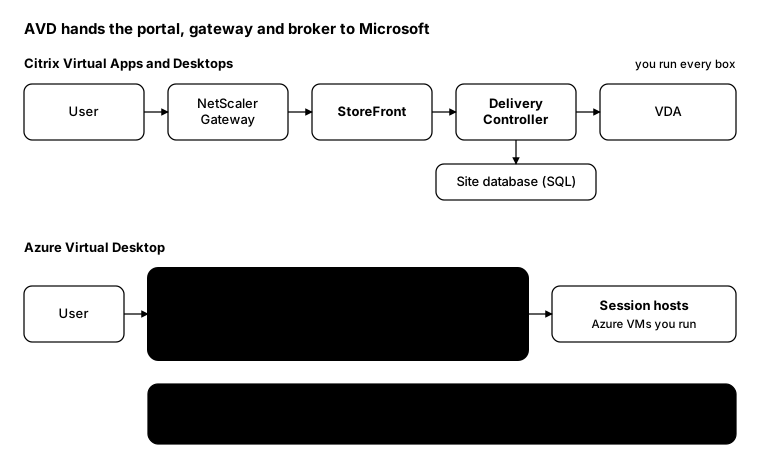
When you move from Citrix Virtual Apps and Desktops to Azure Virtual Desktop, most of what you used to build and patch disappears. NetScaler Gateway, StoreFront and the Delivery Controllers are replaced by a control plane that Microsoft runs for you.
What doesn’t disappear is everything around the session hosts: identity, networking, images and profiles. That’s where the migration effort really goes.
Architecture side by side
What Microsoft runs
Per Microsoft’s AVD architecture training, the control plane is part of Azure:
- Web access: the HTML5 client, replacing the StoreFront web portal
- Gateway: connects remote users without a VPN, replacing NetScaler Gateway for ICA proxy
- Connection broker: load balancing and reconnection, replacing the Delivery Controller
- Diagnostics: records each user and admin action as a success or failure, replacing much of Director
- Extensibility: PowerShell and REST APIs for automation
There’s no SQL site database to back up and no controller to patch.
What you still run
- Session hosts: the Azure VMs, their images, sizing and scaling plans
- Identity: Entra ID for sign-in and Conditional Access, plus AD DS where hosts are domain-joined
- Networking: the virtual network, firewalls and the link back to on-premises
- Profiles: usually FSLogix on Azure Files or Azure NetApp Files
- Security on the hosts: Defender, application control and patching, exactly as with VDAs
Translating the terms
| Citrix | Azure Virtual Desktop |
|---|---|
| Site | Host pools in a region, grouped by workspace |
| Delivery Controller | Connection broker (Microsoft-run) |
| StoreFront | Workspace feed and web access (Microsoft-run) |
| NetScaler Gateway (ICA proxy) | AVD gateway (Microsoft-run) |
| Machine Catalog | Host pool and its session hosts |
| Delivery Group | Application group assigned to users |
| Published desktop / app | Desktop or RemoteApp application group |
| VDA | AVD agent on the session host |
| MCS | Session host configuration or your own image pipeline |
| Autoscale | Scaling plans |
| Citrix Profile Management | FSLogix profile container |
| HDX | RDP, with RDP Shortpath for UDP |
| Director | AVD Insights and Log Analytics |
What doesn’t map one-to-one
- No on-premises option. Classic AVD runs session hosts in Azure. If workloads must stay on your own hardware, look at Azure Local, or stay on Citrix or Horizon.
- Fewer policy knobs. HDX policies cover a lot that RDP properties and Group Policy don’t. Check printing, USB, multimedia and clipboard needs before you commit.
- Cost moves to consumption. You stop buying controllers and start paying for VM hours. Scaling plans and reserved instances matter far more than they did on-premises.
- Licensing is per user. Microsoft 365 E3/E5 and Business Premium include AVD access rights; you still pay for Azure compute and storage.
- Citrix on AVD is an option. If you need HDX features but want Azure hosting, Citrix DaaS can run on top of Azure session hosts.
From the field: the same question in PowerShell
On Citrix you ask the Delivery Controller for sessions. On AVD you ask Azure, using the Az.DesktopVirtualization module.
Citrix (Broker SDK):
Add-PSSnapin Citrix.Broker.Admin.V2
Get-BrokerSession -AdminAddress 'ddc01.contoso.local' -MaxRecordCount 100000 |
    Group-Object MachineName |
    Select-Object Name, Count
Azure Virtual Desktop (Az module):
Connect-AzAccount
Get-AzWvdUserSession -ResourceGroupName 'rg-avd-prod' -HostPoolName 'hp-avd-prod' |
    Group-Object { ($_.Name -split '/')[1] } |
    Select-Object @{ n = 'SessionHost'; e = { $_.Name } }, Count
Each AVD session name is hostpool/sessionhost/sessionid, so splitting on / gives you the session host to group
by.
Bottom line
Moving to AVD swaps infrastructure you run for a service you consume. The control plane gets simpler; the session hosts, identity, network and profiles still need the same care they always did.