Citrix vs Horizon: StoreFront and Delivery Controller vs Connection Server
When you move from Citrix to Omnissa Horizon, the Horizon Connection Server replaces both StoreFront and the Delivery Controller. One component now does the job of two.
That is the key architectural difference. Citrix splits the user-facing front end (StoreFront) from the broker (Delivery Controller), with configuration held in a SQL site database. Horizon puts the portal, authentication, brokering and admin console into each Connection Server, and replicates configuration between them without SQL.
Citrix: two roles, one database
StoreFront is the front door users see:
- Hosts the stores and the web portal for Citrix Workspace app
- Authenticates users, or accepts pass-through from NetScaler Gateway
- Aggregates resources from one or more sites and farms
- Generates the ICA file that launches the session
Delivery Controller is the broker behind it:
- Enumerates the apps and desktops a user is entitled to
- Brokers sessions to VDAs and manages power through the hypervisor
- Provisions machines with MCS (or works alongside PVS)
- Reads and writes the site configuration in SQL Server
- Falls back to Local Host Cache if the site database is unreachable
Horizon: one role, replicated
Connection Server combines both jobs:
- Authenticates users (AD, SAML, RADIUS, smart card, True SSO)
- Serves Horizon Client and HTML Access, so there is no separate portal tier
- Entitles and brokers users to desktop pools, RDSH farms and application pools
- Hosts the Horizon Console for administration
- Drives Instant Clone provisioning through vCenter
- Stores configuration in AD LDS, replicated to every Connection Server in the pod
The first server is a Standard install; every extra one is a Replica that copies the AD LDS configuration and shares the load. Tested limits are 7 Connection Servers and 12,000 sessions per pod. SQL is only needed for the separate Events database, not for brokering.
Architecture side by side
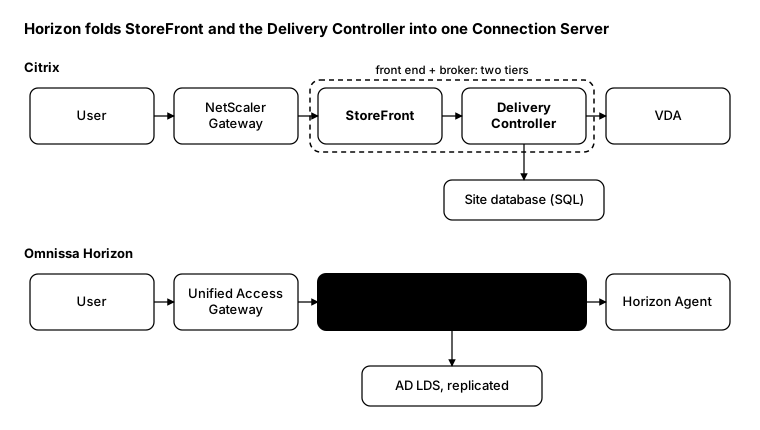
The two Citrix roles inside the dashed box map to a single Connection Server. Both flows are simplified: once brokering is done, the HDX or Blast session runs from the client to the VDA or Horizon Agent, through the gateway when the user is external. A load balancer normally sits in front of StoreFront or the Connection Servers.
Translating the terms
| Citrix | Horizon |
|---|---|
| StoreFront + Delivery Controller | Connection Server |
| Citrix Studio / Web Studio | Horizon Console |
| Site database (SQL) | AD LDS, replicated per pod |
| Monitoring database | Events database |
| Site | Pod |
| Multi-site aggregation / zones | Cloud Pod Architecture, global entitlements |
| Machine Catalog + Delivery Group | Desktop pool, RDSH farm, application pool |
| MCS | Instant Clones |
| VDA | Horizon Agent |
| Citrix Workspace app | Horizon Client |
| HDX / ICA | Blast Extreme (or PCoIP) |
| NetScaler Gateway | Unified Access Gateway |
What doesn’t map one-to-one
- No separate front-end tier to scale. In Citrix you size StoreFront and controllers independently. In Horizon you add Connection Servers, and each one carries portal, broker and console load together.
- A pod has a hard ceiling. Past 7 Connection Servers or 12,000 sessions you need a second pod and Cloud Pod Architecture, not just more servers.
- Don’t stretch a pod across data centres. Omnissa doesn’t support it. Build a pod per site and link them with global entitlements.
- Still put a load balancer in front. Connection Servers need one for HA, just as StoreFront servers did. Your existing NetScaler can keep doing that job.
- Store aggregation becomes global entitlements. If StoreFront aggregates several Citrix sites, plan the equivalent in Cloud Pod Architecture before you cut over.
- Backups change. There is no site database to back up; Connection Servers export their AD LDS configuration on a schedule instead.
From the field: the same question in PowerShell
During an assessment, the first thing I want is a session count from each side. On Citrix you ask the Delivery Controller; on Horizon you ask any Connection Server.
Citrix (Broker SDK):
Add-PSSnapin Citrix.Broker.Admin.V2
Get-BrokerSession -AdminAddress 'ddc01.contoso.local' -MaxRecordCount 100000 |
    Group-Object DesktopGroupName |
    Select-Object Name, Count
Horizon (REST API):
$cs   = 'https://cs01.contoso.local'
$cred = Get-Credential
$body = @{
    domain   = 'CONTOSO'
    username = $cred.UserName
    password = $cred.GetNetworkCredential().Password
} | ConvertTo-Json

$token   = (Invoke-RestMethod "$cs/rest/login" -Method Post -Body $body -ContentType 'application/json').access_token
$headers = @{ Authorization = "Bearer $token" }

Invoke-RestMethod "$cs/rest/inventory/v1/sessions" -Headers $headers |
    Group-Object desktop_pool_id |
    Select-Object Name, Count
Omnissa still ships Horizon PowerCLI
(Omnissa.VimAutomation.HorizonView plus the Omnissa.Horizon.Helper module), for both PowerShell 5.1 and 7.x.
But it sits on the View API, which Omnissa has
announced for deprecation in favour of REST, so new
scripts should target REST.
Bottom line
Citrix separates the front door from the broker and anchors both to SQL; Horizon folds them into replicated Connection Servers and scales by pods. Plan your migration around pod boundaries, not server counts.