Citrix vs Omnissa: Two Approaches to AI Governance
AI agents are arriving on the same desktops and networks we already manage. They call models, use MCP servers to reach business systems, and act through browsers. Both of the big EUC vendors spent 2026 announcing ways to govern that, and they’ve taken quite different approaches.
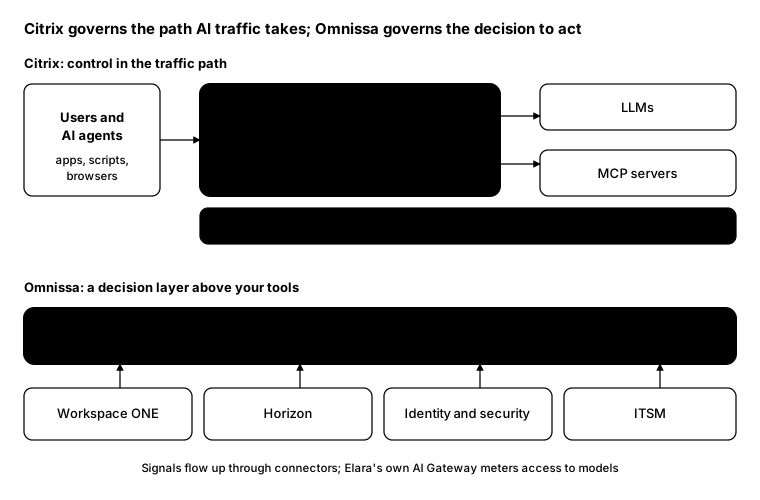
Citrix is extending what it already does well: sitting in the traffic path. NetScaler becomes the gateway that AI traffic flows through.
Omnissa is building a decision layer: a system that sits above your existing tools and decides whether an action should happen before it runs.
Where each one puts control
Citrix: AI in the traffic path
- NetScaler AI Gateway (announced April 2026, available): routes requests across multiple LLMs, applies token-based rate limits, redacts sensitive data from prompts, and reports token usage and latency. Citrix says it’s available to customers now.
- NetScaler MCP Gateway (announced July 2026): a single governed entry point for MCP clients, with authentication, server allow and block lists, rate limits per tool, and usage tracking by team, user or app. Citrix says the NetScaler enhancements are included for Citrix Platform License and Universal Hybrid Multi-Cloud customers.
- Citrix Session Insights (announced September 2026): part of Citrix SecurAccess with Chrome Enterprise. It records browser activity by people and AI agents, uses AI to flag risky moments, and leaves the decision to an administrator.
- Citrix Aidrien (generally available since March 2026): an AI assistant for Citrix admins. It answers questions in plain language, diagnoses failed launches and unregistered machines, and helps plan NetScaler upgrades.
Omnissa: a decision layer above your tools
Omnissa Elara (announced September 2026, in beta) is described as an “authority layer”. Omnissa says it:
- Discovers shadow AI: AI apps, models, agents and MCP servers in use on managed endpoints, including ones outside policy
- Governs AI access: an Omnissa AI Gateway with usage guardrails and token metering across providers
- Authorises with context: decides which actions are allowed before they happen, based on identity, device and policy
- Governs change: checks changes against conflicts, freezes and dependencies, then allows, limits or routes them for approval
- Audits decisions: records who authorised what, and what it touched
Connectors link Elara to Workspace ONE, Horizon, and your identity, security and ITSM tools.
Side by side
| Citrix | Omnissa | |
|---|---|---|
| Approach | Control the traffic path | Decide before actions run |
| AI model access | NetScaler AI Gateway | Omnissa AI Gateway (in Elara) |
| Agent-to-system access | NetScaler MCP Gateway | Context-aware authorisation |
| Shadow AI | Visibility through the gateway | Discovery on managed endpoints |
| Evidence | Session Insights recordings | Decision audit trail |
| Admin assistant | Aidrien | Not covered here |
| Status | AI Gateway and Aidrien available; others announced 2026 | Elara in beta |
How to read this
- They’re not exclusive. A gateway in the path and a decision layer above it solve different problems. Many organisations will want both kinds of control, from one vendor or several.
- Check what’s real. Much of this is new. Separate what’s generally available from what’s announced, in preview or in beta before you plan around it.
- These are vendor descriptions. Everything above comes from Citrix and Omnissa announcements. Test them in your own environment before you rely on them.
Where to start, whichever you choose
- Find out what’s already there. Most organisations have more AI tools and MCP servers in use than they know about.
- Put AI traffic through one door. Whether it’s NetScaler, Elara’s gateway or something else, one path is easier to govern than many.
- Give agents their own identities. If an agent acts as a user, you can’t tell them apart in the logs.
- Keep a human on high-impact actions. Both vendors keep an approver in the loop for actions that matter.
From the field: who’s running MCP servers?
Before buying anything, it helps to know how much shadow AI you already have. Several popular AI tools keep their MCP server list in a JSON file in the user’s profile. This script checks common locations on a machine and lists the servers configured. It isn’t exhaustive, and it works in Windows PowerShell 5.1 and PowerShell 7.
$candidates = @(
    "$env:APPDATA\Claude\claude_desktop_config.json"   # Claude Desktop
    "$env:APPDATA\Code\User\mcp.json"                  # VS Code
    "$env:USERPROFILE\.cursor\mcp.json"                # Cursor
)

foreach ($file in $candidates | Where-Object { Test-Path $_ }) {
    $json    = Get-Content $file -Raw | ConvertFrom-Json
    $servers = if ($json.mcpServers) { $json.mcpServers } else { $json.servers }
    foreach ($s in $servers.PSObject.Properties) {
        [pscustomobject]@{
            Computer = $env:COMPUTERNAME
            User     = $env:USERNAME
            Source   = Split-Path $file -Leaf
            Server   = $s.Name
            Command  = $s.Value.command
            Url      = $s.Value.url
        }
    }
}
Run it through your management tool as the signed-in user, and collect the results centrally. Any server you don’t recognise is a conversation worth having.
Bottom line
Citrix governs the path AI traffic takes; Omnissa governs the decision to act. Neither replaces knowing what AI is already running in your environment, so start there.
Sources
- Citrix introduces NetScaler AI Gateway (Citrix)
- Citrix launches MCP Gateway to secure enterprise AI agents (Help Net Security)
- Citrix adds AI-powered browser activity analysis (Help Net Security)
- What’s new in Citrix Aidrien (Citrix docs)
- Omnissa introduces Omnissa Elara (PR Newswire)
- Omnissa debuts Elara authority layer (Unite.AI)