deviceTRUST and Device Posture: Checking the Device All Session Long
Most access checks happen once, at sign-in. If the device was compliant at 9 am, the session is trusted until the user logs off, even if they move to a café Wi-Fi network or switch off their firewall at 10.
Citrix now has two products that close that gap: the Device Posture service, which checks before sign-in, and deviceTRUST, which keeps checking during the session. Citrix acquired deviceTRUST in late 2024.
Before, during and after sign-in
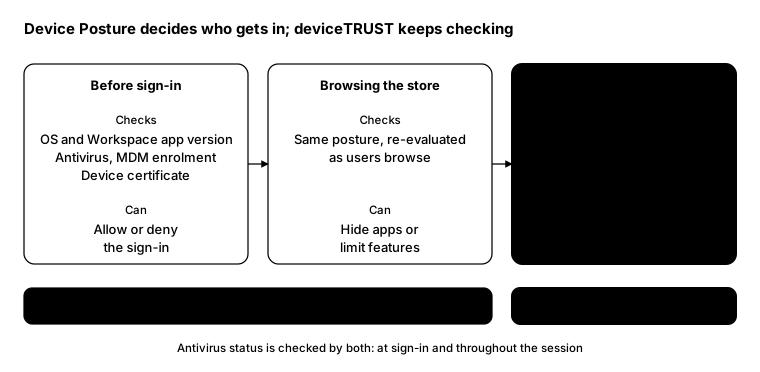
Citrix describes the Device Posture service as “the first line of defense”. It decides whether a device may authenticate at all, then keeps evaluating as the user browses the store, where it can hide apps or limit features.
Once the session starts, “deviceTRUST takes over to provide continuous, in-session contextual access controls.”
What deviceTRUST does
deviceTRUST has three parts: a Console for policy, an Agent and a Client Extension. In a DaaS or VDI setup, the Client Extension collects context on the user’s device and the Agent acts on it inside the session.
It can use context such as:
- Whether the device is corporate-managed or known
- Security state, such as firewall and antivirus
- The network the device is on, and whether it’s trusted
- Location
- USB devices being attached
And it can respond by:
- Refusing access at sign-in, or ending it when conditions change
- Locking or disconnecting the session
- Changing which applications are available
- Showing the user a notification
- Auditing the event, or calling your own scripts and APIs
Practical policies to start with
- Untrusted network: lock the session when the device moves to an unknown or unencrypted Wi-Fi network.
- Security switched off: disconnect when the firewall or antivirus is disabled mid-session.
- Sensitive apps: only allow a finance or HR app from corporate-managed devices.
- USB: block or audit when a USB storage device is attached.
- Start in audit mode: log what would have happened for a couple of weeks before enforcing.
Licensing
Check your Citrix subscription. Which deviceTRUST and Device Posture features you’re entitled to depends on your Citrix edition, so confirm with your Citrix partner before you design around them.
From the field: is it actually installed?
deviceTRUST only works when both halves are present: the Agent on the VDAs and the Client Extension on the endpoints. This check reports both from the registry, and works in Windows PowerShell 5.1 and PowerShell 7.
function Get-InstalledProduct {
    param([string]$Like)
    $keys = 'HKLM:\SOFTWARE\Microsoft\Windows\CurrentVersion\Uninstall\*',
            'HKLM:\SOFTWARE\WOW6432Node\Microsoft\Windows\CurrentVersion\Uninstall\*'
    Get-ItemProperty $keys -ErrorAction SilentlyContinue |
        Where-Object DisplayName -like $Like |
        Select-Object DisplayName, DisplayVersion
}

$vdas = Get-Content .\vdas.txt
Invoke-Command -ComputerName $vdas -ScriptBlock ${function:Get-InstalledProduct} -ArgumentList '*deviceTRUST*' |
    Select-Object PSComputerName, DisplayName, DisplayVersion
Run the same function on a sample of endpoints, or through your management tool, to check the Client Extension.
Bottom line
A sign-in check tells you the device was safe once. Device Posture and deviceTRUST together tell you it’s still safe now, and give you a way to act when it isn’t.