EUC Security Map: Securing a Horizon and IGEL Stack
No single tool secures a virtual desktop environment. An attacker only needs one weak layer: a stolen password, an unpatched gateway, an unknown executable or a local admin account.
This map shows how I layer a Horizon and IGEL environment, from the person signing in to the workload they reach. Each tool owns one job: Entra ID for identity, IGEL OS at the endpoint, Unified Access Gateway at the edge, Defender and Airlock on the session hosts, Action1 for patching. Device management (Workspace ONE or Intune) sits in a separate management stack, so it isn’t covered here.
The map
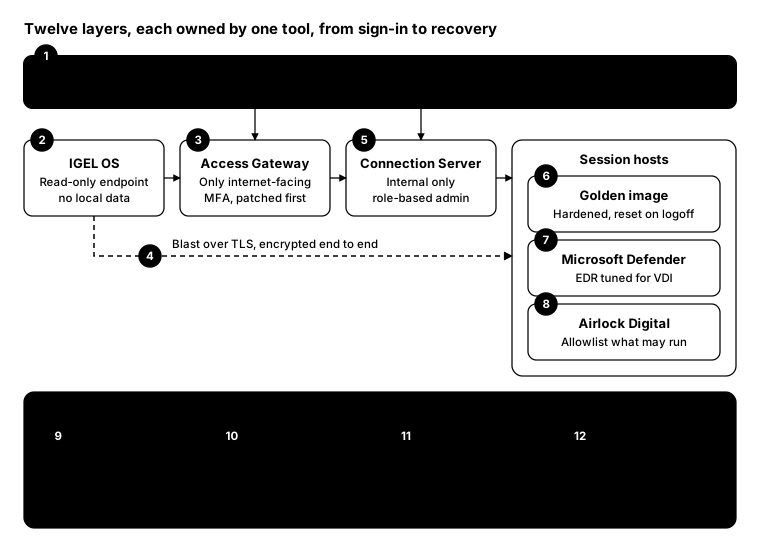
Read it left to right: the user signs in through Entra ID, connects from an IGEL endpoint through the gateway to the broker, and lands on a session host. Operations run underneath every layer; the dashed box is planned.
Layer by layer
- Identity: Entra ID. MFA, Conditional Access and least privilege. Most businesses already pay for this in Microsoft 365, but few use more than sign-in. Why: identity is the new perimeter.
- Endpoint: IGEL OS. A read-only, locked-down OS with no local data, replacing full Windows on the desk. Why: a smaller endpoint is a smaller target.
- Edge: Unified Access Gateway. The only internet-facing component. Patch it fast, enforce MFA here and expose nothing else. Why: the edge is attacked first.
- Transport: Blast over TLS. Encrypt display traffic end to end, and turn off protocols you don’t use. Why: sessions carry sensitive screens and keystrokes.
- Control plane: Connection Server. Internal only, with role-based admin access and separate admin accounts. Why: whoever owns the broker owns every desktop.
- Session hosts: golden image. Harden once, then let Instant Clones refresh on logoff. Why: a non-persistent desktop doesn’t keep what an attacker left behind.
- Detection: Microsoft Defender. EDR on session hosts and any remaining Windows endpoints, tuned for non-persistent VDI. Why: you can’t stop everything, so see it fast.
- Application control: Airlock Digital. Allowlist what may run, and block everything else. Why: unknown executables are where most attacks start.
- Patching: Action1. OS and third-party apps across servers, images and endpoints, on one schedule. Why: most breaches use known, fixable flaws.
- Privilege: endpoint privilege management (planned). Remove standing local admin and elevate only on request. Why: admin rights turn a foothold into a breach.
- Engineer access: vaulted credentials. Admin passwords and sessions brokered through a vault such as Devolutions, never typed from memory. Why: protect the people who hold the keys.
- Recovery and monitoring. Tested backups, plus alerts from Defender, UAG and Horizon events. Why: assume a bad day will come, and be ready to recover.
Mapped to the Essential Eight
For Australian organisations, the stack lines up with all eight ACSC strategies. Office macros and user application hardening still need policy in the golden image; no single tool covers them.
| Essential Eight strategy | Covered by (layer) |
|---|---|
| Application control | Airlock Digital (8) |
| Patch applications | Action1 (9), UAG and Horizon patching (3, 5) |
| Configure Microsoft Office macro settings | Golden image policy (6) |
| User application hardening | Golden image policy (6), IGEL OS (2) |
| Restrict administrative privileges | EPM (10), vaulted engineer access (11), Horizon RBAC (5) |
| Patch operating systems | Action1 (9), IGEL OS updates (2) |
| Multi-factor authentication | Entra ID (1), MFA at UAG (3) |
| Regular backups | Recovery layer (12) |
Architect advice
- Use what’s already licensed. Most small businesses already pay for Entra ID through Microsoft 365. Turn on Conditional Access before buying anything new.
- Patch the edge first. UAG is the one box the internet can reach, so it gets patched before anything else.
- Make the desktop disposable. With non-persistent desktops and a hardened image, a reboot is a clean slate.
- Allowlist, don’t chase. Application control blocks the unknown before EDR has to detect it.
- Keep management and security separate. Device management can change; the security layers shouldn’t depend on it.
From the field: a quick layer check
A map is only useful if the layers are actually running. This check asks each session host whether Defender, Airlock and Action1 are present and healthy, and when it was last patched. It works in Windows PowerShell 5.1 and PowerShell 7.
$hosts = Get-Content .\sessionhosts.txt

Invoke-Command -ComputerName $hosts -ScriptBlock {
    $mp  = Get-MpComputerStatus
    $svc = { param($name) (Get-Service -DisplayName "*$name*" -ErrorAction SilentlyContinue |
             Select-Object -First 1).Status }

    [pscustomobject]@{
        Defender    = $mp.RealTimeProtectionEnabled
        SigAgeDays  = $mp.AntivirusSignatureAge
        Airlock     = & $svc 'Airlock'
        Action1     = & $svc 'Action1'
        LastPatched = (Get-HotFix | Sort-Object InstalledOn -Descending |
                       Select-Object -First 1).InstalledOn
    }
} | Select-Object PSComputerName, Defender, SigAgeDays, Airlock, Action1, LastPatched |
    Format-Table -AutoSize
Anything that comes back blank or Stopped is a layer that isn’t doing its job.
Bottom line
Secure EUC means every layer has an owner: identity, endpoint, edge, broker, image, detection, application control, patching, privilege and recovery. Miss one and the others have to work twice as hard.