Workspace ONE vs Intune: Which One Do You Actually Need?
Workspace ONE UEM and Microsoft Intune both enrol devices, push apps, apply configuration and report compliance. On a feature checklist they look similar. The real question is different: you’re probably already paying for one of them.
Start from the licence
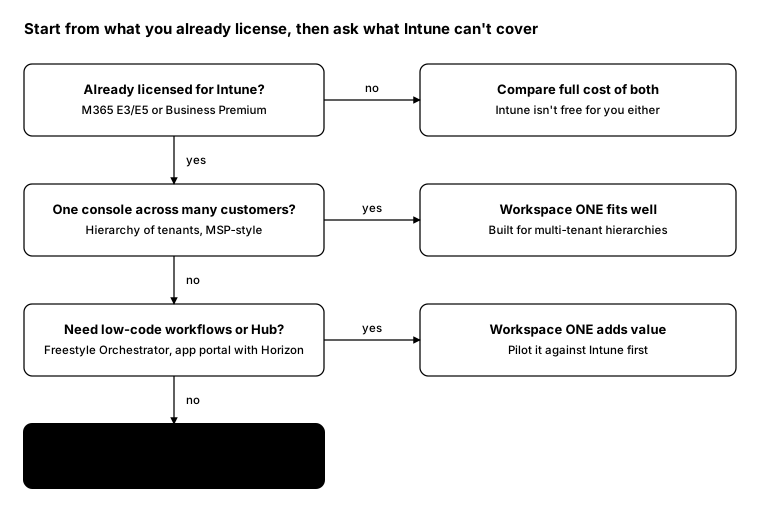
Intune comes with Microsoft 365 E3, E5 and Business Premium. If a business already has those, Intune isn’t an extra cost. Workspace ONE has to justify itself on top of that spend, so the question becomes what it does that Intune can’t, or can’t do as well, for this customer.
Where each one is strongest
| Intune | Workspace ONE UEM | |
|---|---|---|
| Licensing | Included in M365 E3/E5 and Business Premium | Separate subscription |
| Identity | Native to Entra ID and Conditional Access | Integrates with Entra ID and other IdPs |
| Multi-tenant | One Entra tenant per customer; MSPs use tools like Lighthouse | Hierarchy of organisation groups in one console |
| Automation | PowerShell scripts, remediations and Graph | Freestyle Orchestrator low-code workflows, plus API |
| User portal | Company Portal | Intelligent Hub, which can include Horizon apps |
| Platforms | Windows, macOS, iOS, Android, Linux | Windows, macOS, iOS, Android, rugged, Linux |
| Windows 365 and AVD | Native management | Supported, less native |
Omnissa’s own comparison claims stronger multi-OS depth, real-time reporting and low-code automation. Microsoft’s case is integration: one licence, one identity platform and one security stack with Defender. Both are worth testing against your own requirements rather than taking on trust.
When Intune is enough
- The customer already has Microsoft 365 E3, E5 or Business Premium.
- Devices are mostly Windows, with some iOS and Android phones.
- Security is built on Entra ID Conditional Access and Defender.
- There’s someone who can script PowerShell and Graph for the gaps.
When Workspace ONE adds value
- You manage many customers and want one console with a tenant hierarchy.
- There are rugged or shared devices with deep vendor-specific needs.
- You want low-code workflows instead of maintaining scripts.
- Horizon is the delivery platform, and Hub as a single app portal matters to users.
Keep management separate from security
Whichever tool manages the device, the security layers shouldn’t depend on it. Identity, EDR, application control and patching can stay the same if you change management tools later. That makes the decision less risky.
From the field: the same question in PowerShell
The first thing I check in either tool is what’s actually enrolled, grouped by platform.
Intune (Microsoft Graph PowerShell):
Connect-MgGraph -Scopes 'DeviceManagementManagedDevices.Read.All'
Get-MgDeviceManagementManagedDevice -All |
    Group-Object OperatingSystem |
    Select-Object Name, Count
Workspace ONE UEM (REST API):
$uem     = 'https://asXXXX.awmdm.com'
$cred    = Get-Credential
$basic   = [Convert]::ToBase64String([Text.Encoding]::UTF8.GetBytes(
               "$($cred.UserName):$($cred.GetNetworkCredential().Password)"))
$headers = @{
    Authorization    = "Basic $basic"
    'aw-tenant-code' = '<api-key>'
    Accept           = 'application/json'
}

(Invoke-RestMethod "$uem/API/mdm/devices/search?pagesize=500" -Headers $headers).Devices |
    Group-Object Platform |
    Select-Object Name, Count
Replace the console URL and API key with your own, and page through results on larger estates.
Bottom line
Start from what’s already licensed. Intune is enough for most single-company, Microsoft-first environments. Workspace ONE earns its cost where multi-tenant management, low-code workflows or a Horizon-centred user experience matter.